
Record a payment, a part payment or a refund
Not every client pays by card. This guide shows how to record an EFT or cash payment, how part payments work, and how to correct a mistake without losing your records.
Record a full payment
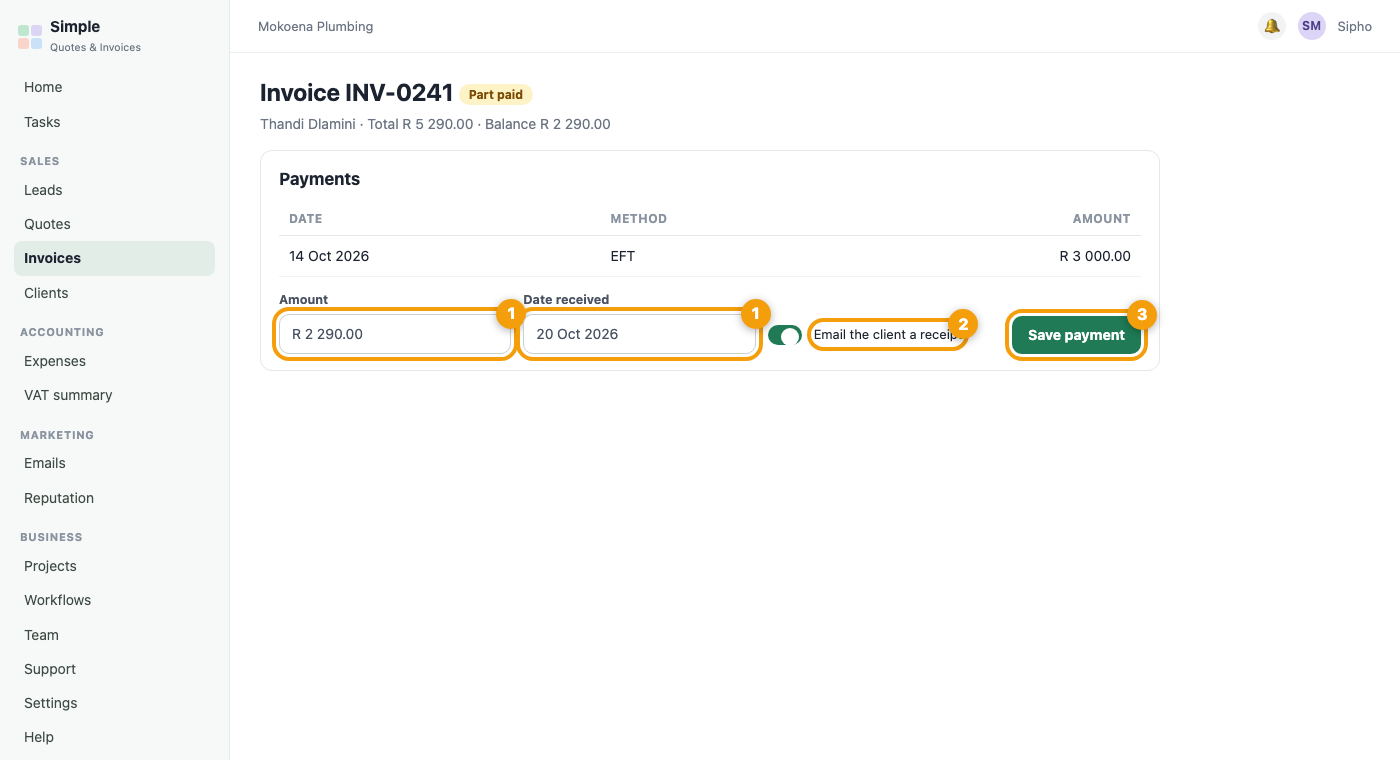
- Open the invoice and scroll to Payments.
- Enter the amount and the date the money arrived.
- Tick Email the client a receipt if you want one sent.
- Save the payment. Paying the full balance marks the invoice Paid.
Record a part payment
Enter the smaller amount in the same way. The invoice stays open with the balance showing, and you can add the next payment later. Each one appears in the payment list with its date.
Fix a payment you recorded by mistake
Payments are never deleted. Use Reverse on the payment, give a reason, and the invoice goes back to unpaid when it should. The original stays on the invoice for your records, with who did it and why.
Refund a card payment
For a payment made through PayFast, open the invoice and use the reverse and refund form. The money is sent back to the card for you and recorded automatically. If a refund cannot be sent, nothing is recorded and you are told why.
Fix a mistake on a sent invoice
If the invoice itself is wrong, create a credit note from it. The credit note reduces the balance and keeps your records clean.
Check the result
- The invoice shows the right status: Paid, or the balance still owing.
- Your client has a receipt if you ticked the box.
- The payment is listed on the invoice with its date.